Add freight costs to an order
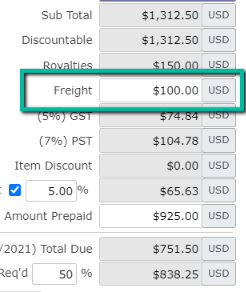
eGrow Connect allows you to add freight costs to an order in two different ways: adding a dollar amount in the Freight line item on the sales order financial summary or including freight as an item on the order.
Note: You can determine if freight will be taxed or not in the tax scheme settings.
Adding freight in the financial summary
The simplest way to add freight costs is by adding a dollar amount in the order for Freight. When you add a freight cost this way on a master order, the same freight cost will be transferred to each split off order.
Adding freight as an item on the order
You can also add freight as an item on the order. To do this, Freight must be created in your Master Items and Size Item Libraries.