Purchase Return Detail Description
This is part of the Purchasing Add-on Module.
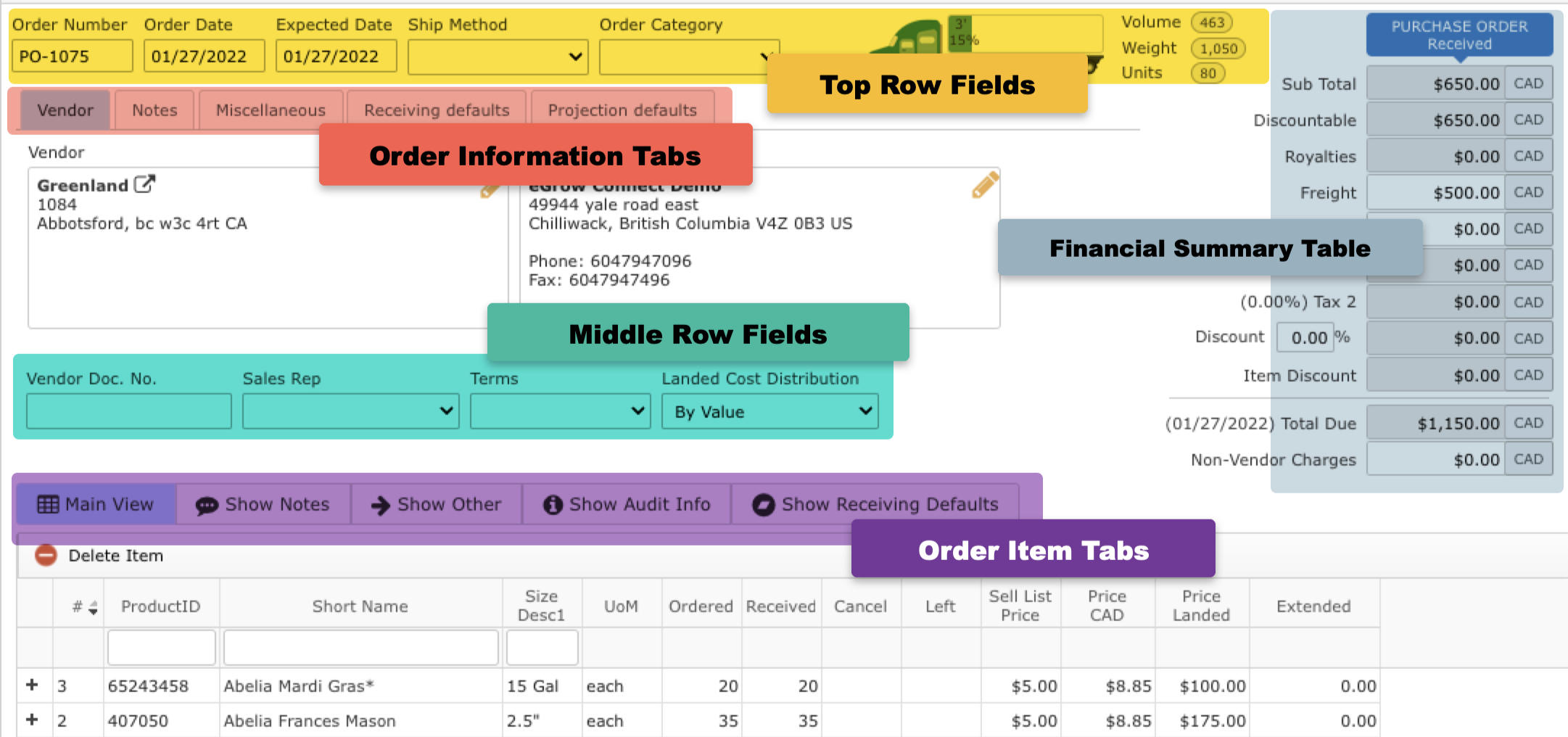
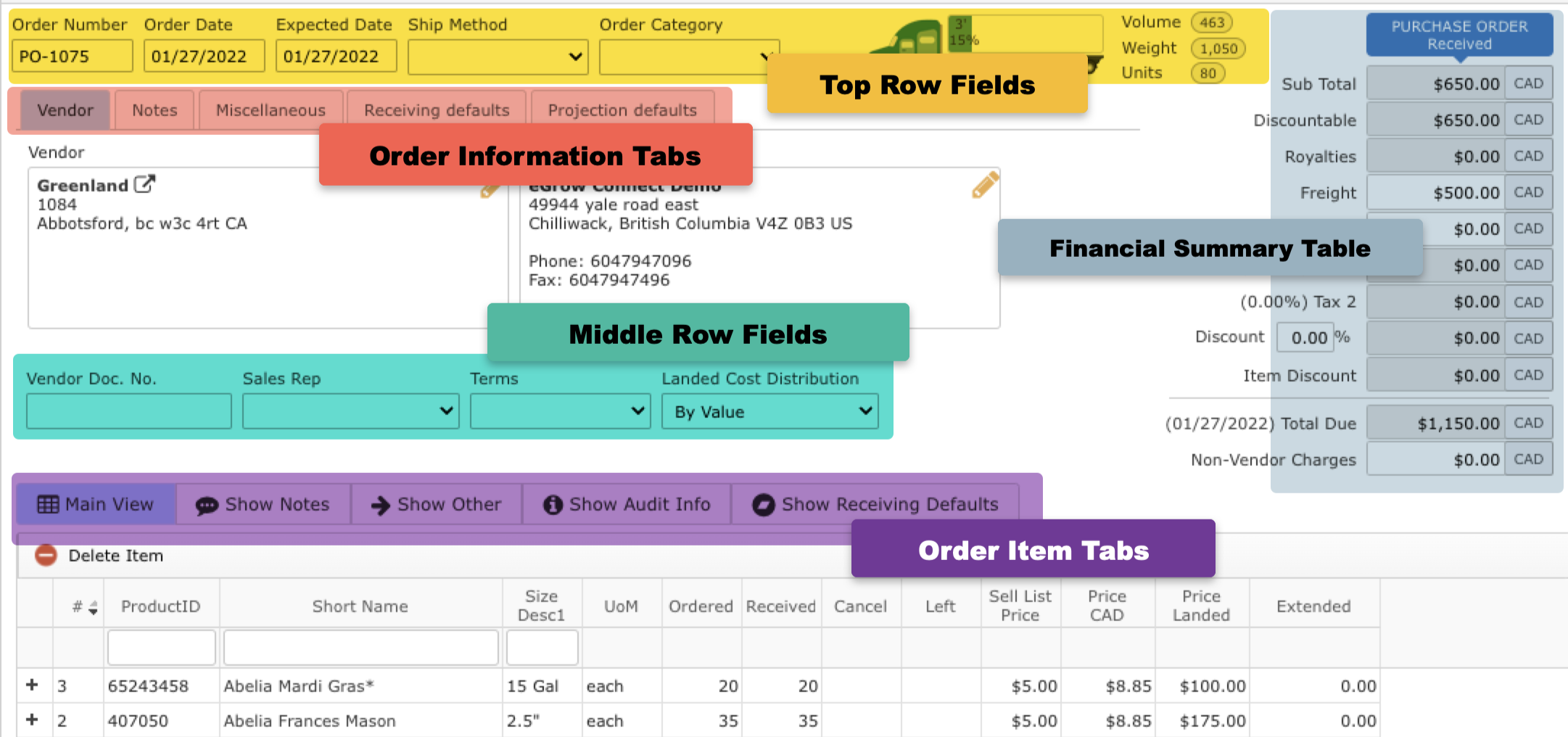
Top Row Fields
- Order Number: An eGrow Connect auto generated return order number that cannot be changed
- Order Date: Date order was placed
- Return Date: Date of return
- Ship Method: Select from shipping methods defined in
 System Setup > Sales > Ship Method
- Order Category: Select from order categories defined in System Setup > Purchase > Order Category
- Truck Icon: Visual display of how much space the order will take up on a truck according to the eGrow Connect load calculations
Financial Summary Table
A financial summary of the entire order.
- Sub total: Combined purchase cost of all items on the order
- Discountable: Combined cost of all the items on the order which have ‘yes’ marked in the “Disc y/n” column.
- Royalties: Combined cost for all plant royalties
- Freight: Enter a dollar amount for the cost of shipping.
- Other: Enter any other costs associated with the order.
- Tax 1 and Tax 2: Tax percentages to be added to the total as determined by the tax scheme selected on the Miscellaneous order info tab
- Discount: The percentage entered in the % field will be applied to the amount in the Discountable field above
- Item Discount: The total combined amount from all itemized discounts as entered in the “Disc %” column on the Show Other item list tab
- Total Due: Total net amount due on the order
- Non-Vendor Charges: Any extra costs incurred that are not associated with the vendor can be entered here (i.e. state inspection fees, etc.)
- Vendor: Select the Vendor address items are to be shipped from .
- Deliver to: Select your ship to address that items are to be delivered to.
- Tax Scheme: Select a tax scheme for the order from the options managed in System Setup.
- Exchange Rate: With the Multi-Currency Add-on Module, this option appears for the order which can be updated to set the currency and exchange to your defualt currency as needed.
|
Middle Row Fields
Most of these fields will autofill with default information from the Vendor module.
- Vendor Doc No.: A document number for the returh supplied by the vendor
- Sales Rep: The vendor contact that handled the sale which is selected from a list of all contacts defined for the vendor with the "Is Sales Rep" option checked
- Terms: The payment terms of the sale selected from options defined in System Setup
Order Items Tabs
- Main View
- Show Notes
- Show Other
- Show Audit Info
- Show Receiving Defaults
- UoM: Unit of Measure for the item.
- Return Qty: Quantity for return
- Return Allocated: Quantity which has been allocated.
- Sell List Price: The list price as created in the Item Size Library.
- Price (Currency): The vendor price. With Multi-Currency Add-on Module, this price will be converted using the Exchange Rate tool in the Miscellaneous tab above.
- Extended: Item subtotal amount (= Unit Price X Ordered)
A place to write notes about individual items on this order.
- Item Notes: Notes for the customer about the plants (ie. "These may be a bit small")
- Internal Notes: Notes for your internal use (ie. special instructions about an item once it is received)
- Royalty: Money added to the price per item to pay royalty fees
- Disc y/n: If yes, any order discounts will be applied to this item. If no, order discounts will not be applied to this item. You can change the default of items to be Not Discountable or change them individually on each order.
- Disc %: A discount percentage that only applies to a specific item.
- Taxable: If yes, the tax scheme of the order will be applied to this item. If no, no taxes will be applied to this item.
- Footage: the calculated footage of each item..
- Weight: Combined weight of the items based on the weight set in the Item Sizes Library.
- Orig. Order Number: The PO number that the item was returned from, if applicable.
- Created: The date and time this item was originally added
- Modified: The date and time of the last update to this item
- User: The name of the user who added the item
Enter line item information about each item.
- Ready: Select a ready date.
- Location: Select a location.
- Bed: Enter a more specific location detail.
- Lot ID: Enter a unique ID that will be used to track this specific crop over time (rrequires the Lot Tracking Add-on Module).
- Customer: If the items on the purchase order are being purchased for a specific customer, enter their name here to lock all the items on the order for that customer only. Tip: You may also control this for each line item if the line item default setting is toggled on in the Receiving Defaults tab above.
- Comments: Enter comments about the items on the order.
|