Purchase Order Detail Description
This is part of the Purchasing Add-on Module.
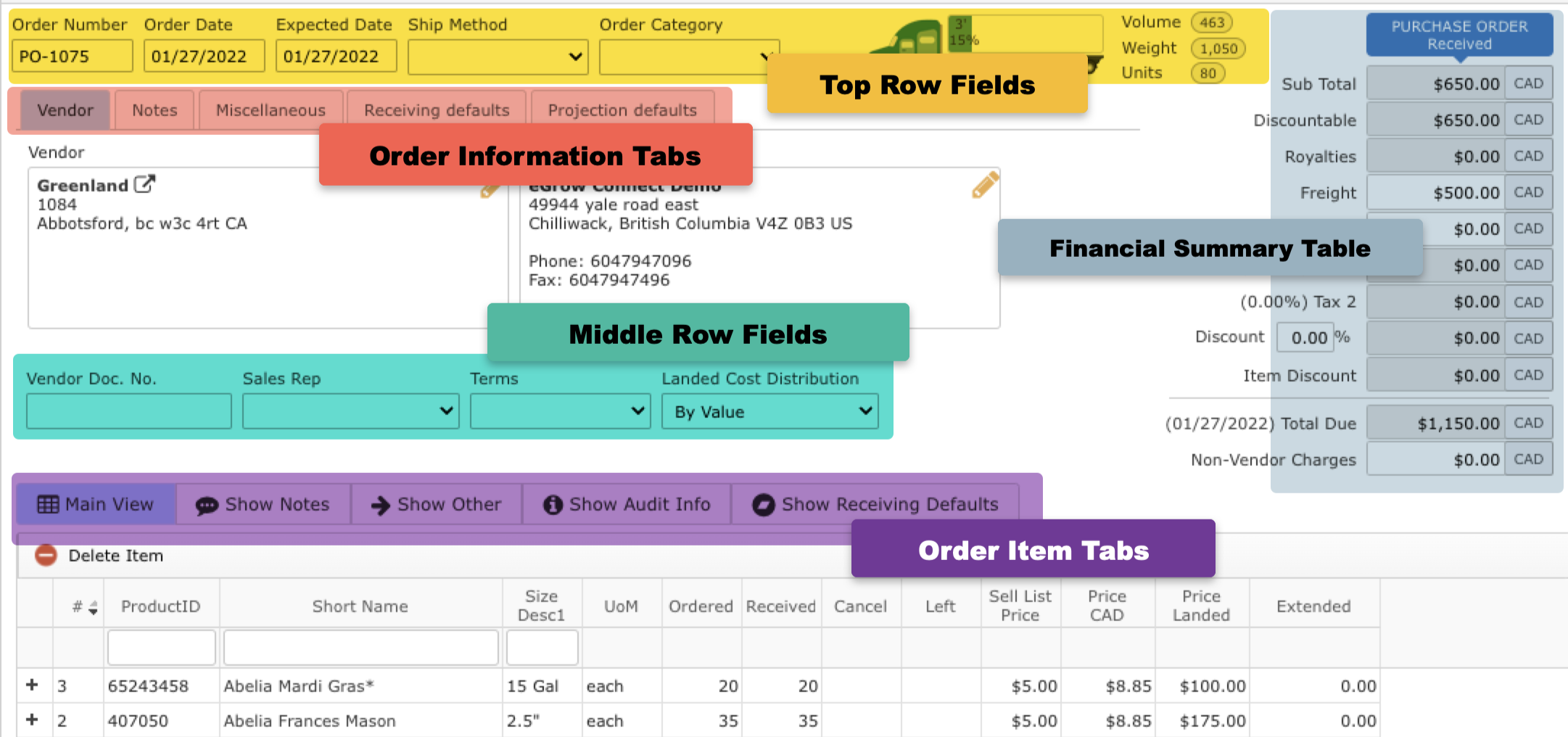
Top Row Fields
- Order Number: An eGrow Connect auto generated purchase order number which is not editable
- Order Date: Date order was placed
- Expected Date: Date items will be shipped
- Ship Method: Select from shipping methods defined in
 System Setup > Sales > Ship Method
 - Order Category: Select from order categories defined in System Setup > Purchase > Order Category
- Truck Icon: Visual display of how much space the order will take up on a truck according to the eGrow Connect load calculations
Financial Summary Table
A financial summary of the entire order.
- Sub total: Combined purchase cost of all items on the order
- Discountable: Combined purchase cost of all the items on the order which have ‘yes’ marked in the “Disc y/n” column on the Show Other item list tab
- Royalties: Combined cost for all plant royalties
- Freight: Enter a dollar amount for the cost of shipping
- Other: Enter any other costs associated with the order
- Tax 1 and Tax 2: Tax percentages to be added to the total as determined by the tax scheme selected on the Miscellaneous order info tab
- Discount: The percentage entered in the % field will be applied to the amount in the Discountable field above
- Item Discount: The total combined amount from all itemized discounts as entered in the “Disc %” column on the Show Other item list tab
- Total Due: Total net amount due on the order
- Non-Vendor Charges: Any extra costs incurred that are not associated with the vendor can be entered here (i.e. state inspection fees, etc.)
Order Information Tabs
Enter an external and Internal notes that apply to the entire purchase order. Internal notes will not appear on printed order reports. Learn more about purchase order notes.
Information entered here will be used as the default for purchased items when using the
Information entered here will be used as the default for purchased items when using the Example Scenario: A grower is planning to add items from two or more purchase orders from different vendors onto sales orders using |
 In Transit or the
  Receive Items functions. The fields with * will be used when the order is set to In Transit.
 Add to Projections function in the taskbar.
Middle Row Fields
Most of these fields will autofill with default information from the Vendor module.
- Vendor Doc No.: A document number for the order supplied by the vendor
- Sales Rep: The vendor contact that handled the sale which is selected from a list of all contacts defined for the vendor with the "Is Sales Rep" option checked
- Terms: The payment terms of the sale selected from options defined in System Setup
- Landed Cost Distribution: Select a method for calculating the landed cost of items
Order Items Tabs
A place to write notes about individual items on this order.
Manage receiving defaults for each line item here. Note: In order to have separate settings by item the Enable receiving defaults by Item setting must be toggled on in the Receiving Defaults order info tab above.
|